![WINWON (Standard).png]](https://knowledgebasefaqs.winwontech.com/hs-fs/hubfs/WINWON%20(Standard).png?height=40&name=WINWON%20(Standard).png)
🔎 What is the Activity Log?
The Activity Log is a recruiting-specific feature in WinWon that records all communication and activity tied to an individual recruit. It is visible to any user with access to that recruit’s profile and updates in real time as new actions are taken.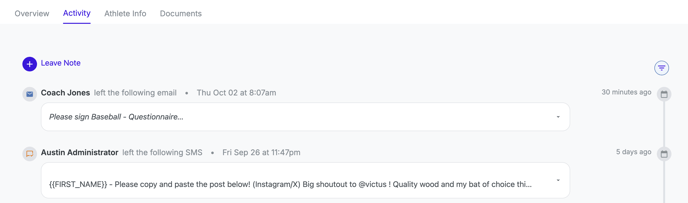
This makes it a powerful tool for:
-
Keeping coaching staff aligned on touch points with each recruit.
-
Giving administrators or compliance staff a full history of recruiting activity.
-
Ensuring consistent and timely outreach to top prospects.
📍 Where to Find the Activity Log
-
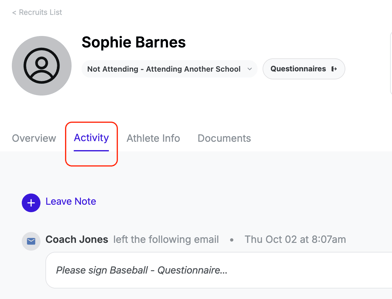
Web: Open a recruit profile and select the Activity tab.
-
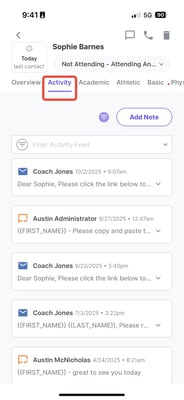
Mobile App: Navigate to the recruit profile and tap the Activity tab.
📝 What Gets Logged?
Every time you take an action with or about a recruit, it is logged automatically. Each log entry shows:
-
Activity type (note, email, text, call).
-
User name of the person who took the action.
-
Date and time of the activity.
-
Details of what was sent or noted.
Examples of activities tracked: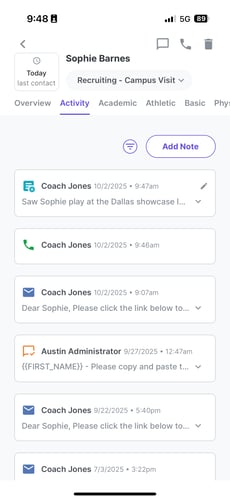
-
Notes – Write after a phone call, in-person visit, or evaluation at an event.
-
Calls – Calls initiated through the WinWon mobile app.
-
Texts – Text messages sent to a recruit from the WinWon mobile app.
-
Emails – Emails sent through the WinWon platform, including questionnaires.
🔧 Filters & Views
Use the filter icon (cone symbol) to focus on the types of activity you want to see. For example:
-
Show only notes to catch up on evaluations.
-
Show only texts and calls to review recent communication.
➕ Adding Notes
In addition to auto-logged activities, you can add your own notes directly from the Activity Log on both web and mobile. This is useful for capturing context that doesn’t automatically generate from an email, text, or call.
🌟 Why Use the Activity Log?
The Activity Log creates a single source of truth for each recruit. With it, your staff can:
-
See a full history of communications.
-
Avoid duplicate outreach or conflicting messages.
-
Ensure the right cadence of contact is being maintained.
-
Document evaluation notes in one shared, accessible place.
✅ Quick Recap
-
Access from the Activity tab on any recruit profile (web or mobile).
-
Logs notes, calls, texts, and emails automatically.
-
Shows who did what, when, and the content of the action.
-
Filter by activity type to find what you need quickly.
-
Add notes directly to keep communication organized.