![WINWON (Standard).png]](https://knowledgebasefaqs.winwontech.com/hs-fs/hubfs/WINWON%20(Standard).png?height=40&name=WINWON%20(Standard).png)
Overview
The Messages Outbox provides visibility into every message sent from your WinWon account, whether it’s a questionnaire, form request, or a standard email. Use this tool to confirm delivery, monitor engagement, and keep a record of communication history.
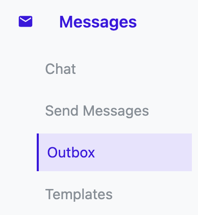
Access the Outbox by navigating to:
Messages > Outbox in the side navigation panel.
Outbox Table Layout
The Outbox displays messages in a sortable, filterable table with the following columns: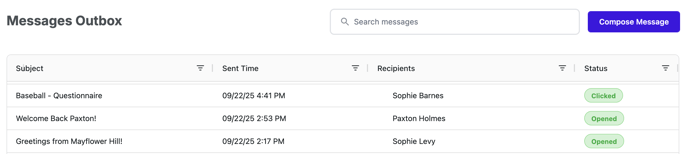
-
Subject – The subject line of the message sent.
-
Sent Time – The exact date and time the message was sent.
-
Recipients – Shows the recipients of the message:
-
If the message was sent to one person, their name will display.
-
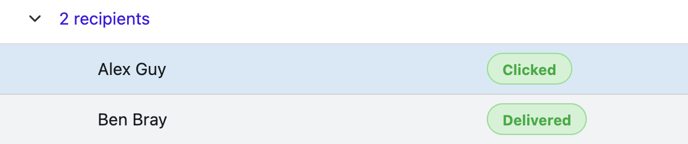
If the message was sent to multiple recipients, you’ll see “X recipients.”
-
Use the ▼ (carrot icon) to expand the list and view all individual recipients.
-
-
Status – Displays the current state of the message.
Status Indicators
Each message is tracked with a status chip:
-
Gray – Sent: The message was successfully sent but no engagement has been recorded yet.
-
Green – Delivered: The message was successfully delivered to the recipient’s inbox.
-
Green – Opened: The recipient opened the message.
-
Green – Clicked: The recipient clicked a link in the message.
💡 Tip: Statuses update in real time as recipients interact with your messages.
Viewing Message Details
Click on any status chip to open a detailed preview panel.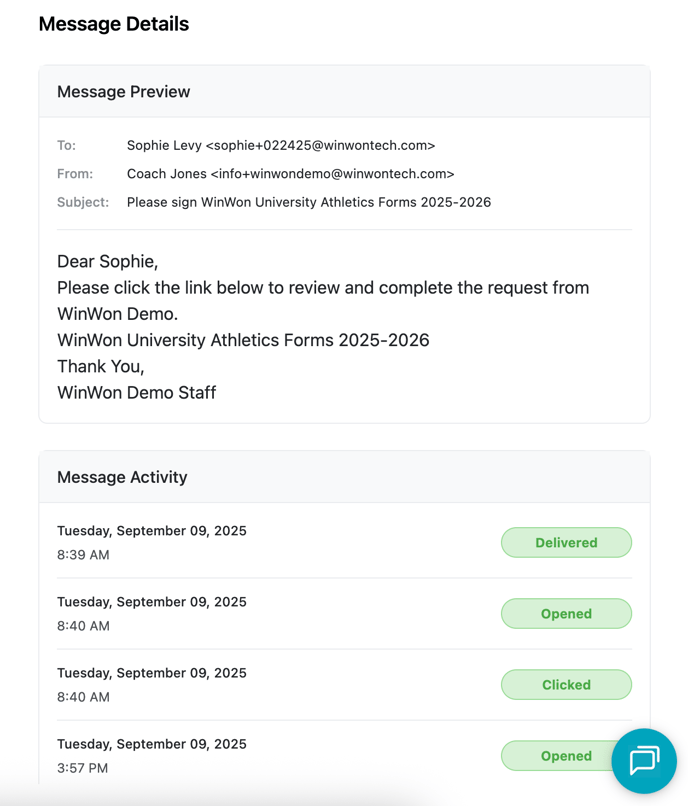
Message Preview
-
Displays To, From, Subject line, and the Email body exactly as it was sent.
Message Activity
A timeline of recipient actions, including:
-
Date and time the message was delivered
-
Date and time the message was opened (if applicable)
-
Date and time the message was clicked (if applicable)
This allows users to confirm not just delivery, but also engagement with critical communications.
✅ With the Messages Outbox, you’ll never wonder whether a communication went through. You’ll know exactly when it was sent, who received it, and how recipients interacted with it.