![WINWON (Standard).png]](https://knowledgebasefaqs.winwontech.com/hs-fs/hubfs/WINWON%20(Standard).png?height=40&name=WINWON%20(Standard).png)
With real-time updates to team calendars, direct announcements from coaches, and their personal eligibility overview, students will always know where to be, when to be there, and if they are compliant—no more missed practices, games, team updates, or compliance tasks.
📲 Who Can Access the App?
To access the student athlete app, a student must be listed on a team roster in WinWon.
If a student is not on a roster, they will not be able to log in.
🔗 Download the App
💬 Easily Share the App with Your Athletes
WinWon makes it easy for staff to share the app with student-athletes directly:
-
Go to Messages > Templates from the left-hand menu in the web app.
-
Look for the template labeled with the purple "System" chip.
-
Click Draft Message to preview the message.
-
Personalize the text if needed, then send it to your student-athletes.
-
The message includes download links for both iOS and Android.
-
🔐 Logging In for the First Time
After downloading the app, students will:
-
Enter their school email address — this must match the email on their WinWon student profile.
-
Tap “Forgot your password?” to set a password and log in for the first time.
-
Follow the prompts to create a password and complete login.
🔔 Enabling Push Notifications
Push notifications are the fastest way for students to receive important updates and announcements.
-
When logging in for the first time, students will be prompted to allow push notifications.
-
To check or enable notifications later:
-
Tap the Profile icon from the bottom menu.
-
Ensure “Allow Push Notifications for Announcements” is toggled ON.
-
Students who opt not to receive push notifications will still receive email alerts for new announcements.
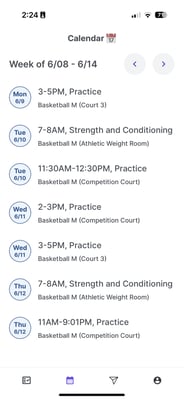
📅 What Students Can See in the App
The Student Athlete App focuses on three key areas:
1. Calendar
-
Displays all events student-athletes are invited to across their assigned teams.
-
If your staff uses Groups, only students in the invited group will see that event.
-
The calendar updates in real-time with any edits, cancellations, or new events made by coaches.
2. Announcements
-
Shows all messages sent to student-athletes through the Coaches Mobile App.
-
Students with push notifications enabled will get notified instantly.
-
Students without push enabled will receive these messages by email.
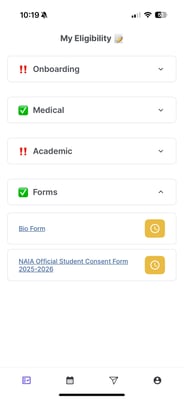
3. Eligibility
-
Shows students a view-only eligibility checklist of items they've completed for onboarding eligibility, medical eligibility, and academic eligibility.
-
Sent out compliance forms for signature? Students can access them seamlessly in the app.
✅ Keep Students in the Loop
From game day changes to schedule reminders, WinWon ensures your athletes are always informed, aligned, and ready to go. The Student Athlete App is your direct line to your teams—no clutter, no confusion, just clear communication.