![WINWON (Standard).png]](https://knowledgebasefaqs.winwontech.com/hs-fs/hubfs/WINWON%20(Standard).png?height=40&name=WINWON%20(Standard).png)
Overview
The WinWon Time Tracking page gives coaches and administrators a detailed view of all calendar events for their teams while monitoring key compliance metrics. For NAIA, the system tracks total weeks and days used to help you monitor NAIA limits per team like:
-
-
24 total weeks of countable activities
-
Weekly off-day requirements
-
Accessing Time Tracking
-
Navigate to Calendar > Time Tracking.
-
Calendar Admins: Can view and manage time tracking for all teams.
-
Coaches: Only see their assigned teams (or multiple if they coach more than one). Toggle between teams in the top-right menu.
Notes Box

At the top of the page, Calendar Admins can add a summary message. This can be key information, a note, a reminder, or an important update.
-
Only Admins can edit this note (using the pencil icon in the box).
-
All teams will see the same note when they access Time Tracking.
Setting Season Dates
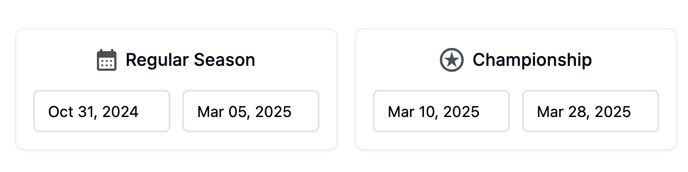
Enter Regular Season Start/End and Championship Start/End dates for your team.
-
Designed to help you keep key dates top of mind.
-
Helps administrators who may not memorize sport-specific dates.
Event Totals (NAIA)

For NAIA, the Event Totals box shows:
-
Total Weeks – Weeks with at least one event scheduled.
-
Total Days – Unique days with scheduled events.
Updates automatically as events are added, edited, or deleted.
Viewing Options

-
Show Weeks (toggle) – Displays events grouped by week. Each week shows dates covered. Click the caret to expand and see events.
-
Show Off Days (toggle) – Available only when Show Weeks is on.
-
Displays a chip next to each week showing number of Off Day events in that week.
-
☑️ Gray = 1 or more off days scheduled
-
⚠️ Yellow = 0 off days scheduled
-
NAIA Time Tracking Table

Columns include:
-
Event Date & Time – Day, start time, end time
-
Event Type – Practice, competition, strength, etc.
-
Location – Facility where event is held
-
Time Tracking Notes – Free text field for adding any context
Table Features
-
Sort any column by clicking the header.
-
Filter Event Type and Location using the filter icon.
-
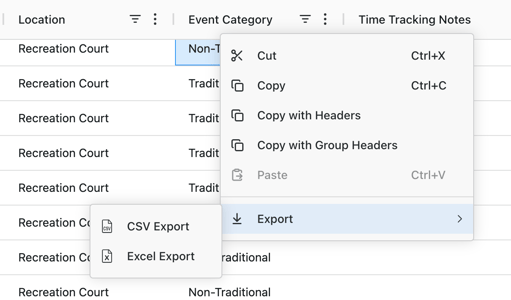
Export table to Excel/CSV by right-clicking anywhere in the table.
🔗 Want tips for keeping your NAIA team compliant? See our Best Practices for Time Tracking article for recommended workflows and tips!